10 Free Online Face Blur Tools Compared (2026): Which Ones Upload Your Photo?
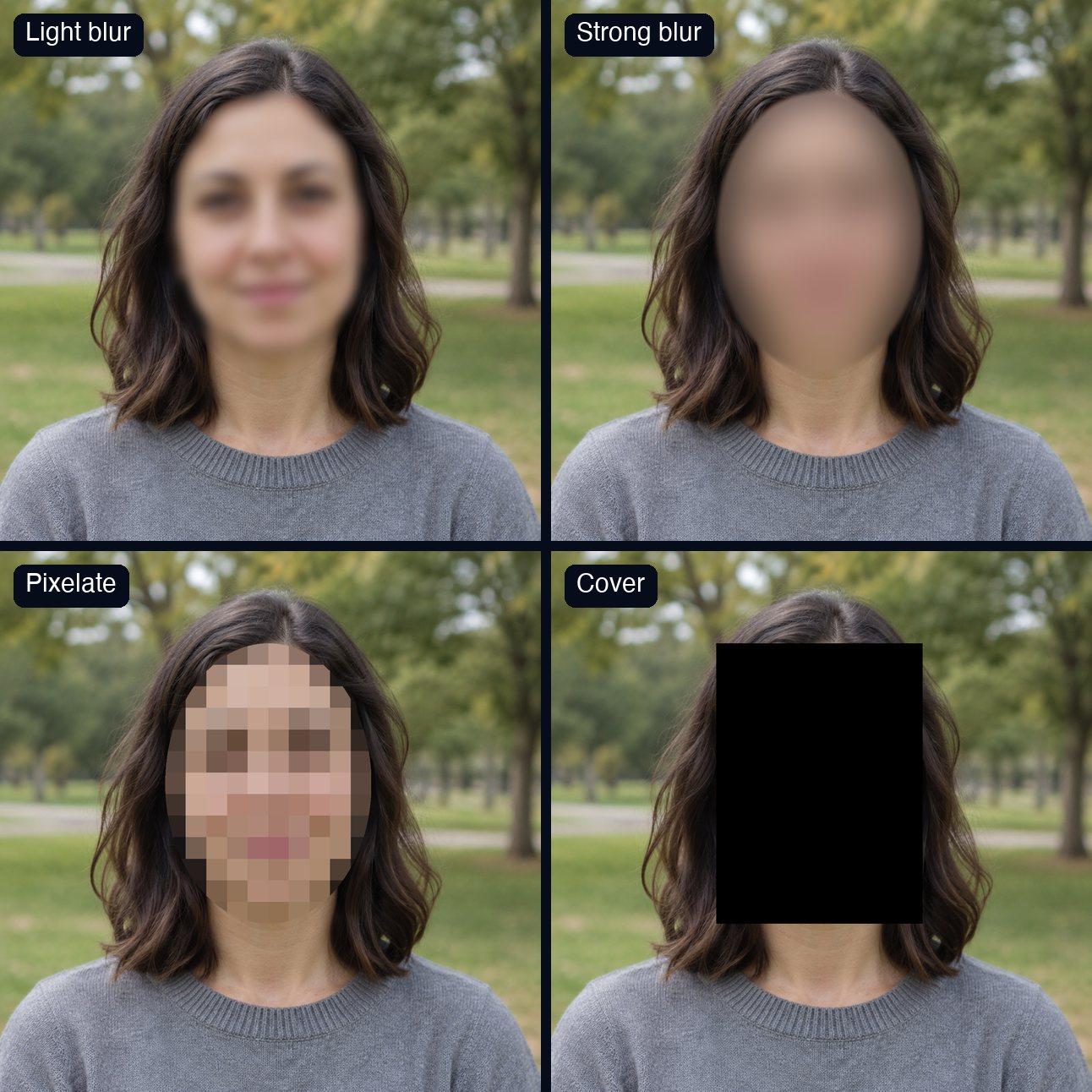
Short answer: of the ten tools below, four say they blur faces inside your browser without uploading the file: our own BlurQ face blur tool, Facepixelizer, Watermarkly and blur-face.com. BlurMe and iLoveIMG say they work on their servers. YouBlur says servers may be involved. Kapwing describes itself as cloud based. Canva and Picsart do not say on the pages we read.
Disclosure: the first tool in the table is ours. Everything about the other nine comes from their own pages, read on 23 November 2026, and not from hands-on testing. Where a page does not say something, the table says so. Prices are as of November 2026.
Comparison table
“Their words” means a quote from the tool’s own site. A claim is a promise, and you can check it yourself: open the browser’s Network panel, or load the page, go offline and see if the blur still works.
| Tool | Finds faces automatically | Where the file is processed (their words) | Photo or video | Free limits, watermark, sign-up | Styles |
|---|---|---|---|---|---|
| BlurQ web tool | Yes; tap a face to switch it on or off | In the browser; the photo is never uploaded | Photos only | Free, no watermark, no account | Blur, pixelate, mosaic |
| Facepixelizer | Yes; the page says it may miss tilted or side-on faces | “they never leave your browser and are never sent over the network” | Photos (JPG, PNG) | “completely free”; watermark and sign-up are not mentioned | Pixelate, blur, solid black |
| Watermarkly Blur Faces | Yes; also license plates | “We process files on your device.” | Photos, in batches | No registration; free version adds a Watermarkly logo | Blur with adjustable intensity; oval or rectangle |
| blur-face.com | Yes | “not intentionally sent to a Blur Face image-processing server” | Photos and video (MP4, MOV) | Free, no sign-up; says video exports carry no watermark | Blur, pixelate, emoji, opaque cover |
| BlurMe (blur.me) | Yes; faces and plates | “BlurMe finds and hides them on our servers.” | Photos, video, PDF | Free plan: watermark, video up to 10 seconds, low quality | Blur, pixelation, solid cover |
| YouBlur | Yes; faces and plates | “Uploading and processing may involve servers, depending on the feature.” | Photos and video | Free account; 1080p, 100 MB, 50-second video, 10 jobs in total | Blur, pixelation; black mask on some plans |
| Canva | Not mentioned; you paint the blur with a brush | The blur help page does not say | Photos only | Not stated on the help page | Blur with an intensity slider |
| iLoveIMG Blur face | Yes; low and high detection settings | “Your file travels encrypted to our servers” | Photos | Free with limits (numbers not given); watermark not mentioned | Blur |
| Picsart video face blur | Yes; says the blur follows moving faces | Does not say | Video (MP4, MOV) | Says free with no watermark; sign-up not stated | Blur, pixelate, mosaic |
| Kapwing Blur Video | By text prompt; you describe what to blur | “Kapwing is cloud based” | Video | Free editor; the page says “No watermark on Pro” | Blur |
BlurQ blur faces online
Our free face blur tool finds the faces in a photo, and you tap each face to blur it or leave it sharp. A manual brush covers anything else. The photo stays in your browser, there is no watermark and no account. What it cannot do: video, batches and automatic license plates. For those jobs, use one of the tools below. More on how the no-upload part works is in blur faces online with no upload.
Facepixelizer
Facepixelizer is an older in-browser editor that is still online. It has face detection, plus a drag tool that pixelates faces and blurs text, with a manual mode for blur, pixelate or solid black. The page says images never leave the browser and that saving removes all Exif data, including date and location. It works on JPG and PNG photos and says a mobile version runs in the phone’s browser. The page carries a 2013 to 2015 copyright line, so expect an older design.
Watermarkly Blur Faces
Watermarkly is the batch option. You drop in many photos, faces are blurred in all of them, and you then pick which faces stay visible. It also blurs license plates automatically, and the site says files are processed on your device and not sent to its servers. No registration is needed. The catch is the free version: it adds a Watermarkly logo to every processed image. Removing it costs $19.95 for one year or $39.95 once.
blur-face.com
Blur Face covers both photos and video in the browser. Its wording is careful: source files are “not intentionally sent” to its processing server, while normal page requests, analytics and ads may still happen. The video tool takes MP4 and MOV files, tracks faces across frames and offers blur, pixelate or a black bar. The site says it adds no watermark to exported video and needs no sign-up. It also warns that tracking can miss faces and tells you to review frame by frame. Speed depends on your own device, because the browser does the work.
BlurMe
BlurMe is a server-based service for photos, video and PDFs. It detects faces and license plates, lets you click a face to keep it visible, and says the cover follows people as they move. The site is open about where the work happens: on its servers, with guest files deleted after about one day and files not used for AI training. The free plan adds a watermark, limits video to 10 seconds and exports in low quality. Paid plans start at $7 a month, billed yearly.
YouBlur
YouBlur blurs faces and license plates in photos and video. Its English page says uploading and processing may involve servers, and asks people with strict data rules to contact the company before uploading. You need a free account. The free tier is capped at 1080p, 100 MB per file, 50 seconds of video and 10 jobs in total. Paid credit packs start at €7.90 as a one-time purchase. The home page shows a “No watermark” badge.
Canva
Canva can blur part of a photo, but its blur help page describes a brush you drag over the area, with size and intensity sliders. It does not mention face detection. The same page says the Blur tool is not available for video designs. The steps start from photos in your Canva projects. If you already design in Canva, the brush is fine for one face. Our guide to blurring faces in Canva has the steps.
iLoveIMG Blur face
iLoveIMG detects faces automatically, with a low or high detection setting, and lets you add your own blur areas. Its security page explains the flow in plain words: the file is uploaded to its servers, processed, and deleted within 2 hours, or at once if you press “Delete now”. The same page notes that some iLoveIMG tools run locally, but the Blur face page shows an upload step. The free plan has processing limits that the pricing page does not put a number on. Premium is $4 a month billed yearly, or $7 billed monthly.
Picsart and Kapwing for video
Both of these are video tools. Picsart’s video face blur says it detects faces automatically, keeps the blur on them as they move, offers blur, pixelate or mosaic, and exports free with no watermark. The page does not say where the video is processed.
Kapwing’s Blur Video works by prompt: you describe what to blur, such as faces in a crowd, and it builds a mask that tracks the object. Kapwing calls itself cloud based, and the page says “No watermark on Pro”.
Which to use when
- One photo, quickly: the BlurQ web tool. Open the page, drop the photo, tap the faces, save. No account and no watermark.
- A video: blur-face.com if the clip should stay on your device, or Picsart if you prefer an online editor that says it exports free with no watermark. BlurMe and YouBlur also do video, with short free limits (10 and 50 seconds). On iPhone, an app is often easier: see how to blur faces in videos.
- A batch of photos: Watermarkly. It is built for many files at once. The free version adds its logo, so plan to pay if the photos are for publishing.
- Maximum privacy: one of the four that say they process in the browser (BlurQ, Facepixelizer, Watermarkly, blur-face.com). Then test the claim by going offline after the page loads. Background reading: blur photos without uploading to the cloud.
- No sign-up: BlurQ, Watermarkly and blur-face.com say so directly. YouBlur needs a free account.
- License plates: Watermarkly for photos; BlurMe or YouBlur for photos and video. Our tool does not detect plates.
Alternatives to YouBlur, BlurMe and Facepixelizer
YouBlur alternatives: for video without an account, try blur-face.com (in the browser) or Picsart. For photos without an account, the BlurQ web tool or Watermarkly. If you need plates in video and accept server processing, BlurMe is the closest match.
BlurMe alternatives: if the 10-second, watermarked free plan is the problem, blur-face.com and Picsart both say they export video without a watermark. If the server upload is the problem, blur-face.com says video is processed in your browser. For photos only, use BlurQ, Facepixelizer or Watermarkly.
Facepixelizer alternatives: if you want the same no-upload idea with tap-to-toggle faces and a mosaic style, use the BlurQ web tool. For many photos at once, Watermarkly. For video, blur-face.com.
Frequently Asked Questions
- Can I blur a face online for free?
- Yes. BlurQ’s web tool, Facepixelizer and blur-face.com are free for photos. Watermarkly is free but adds its logo. BlurMe, YouBlur and iLoveIMG have free tiers with limits.
- Which online face blur tools do not upload my photo?
- According to their own pages: BlurQ’s web tool, Facepixelizer, Watermarkly and blur-face.com process the file in your browser. BlurMe and iLoveIMG say they process on their servers, and YouBlur says servers may be involved.
- Which free tools add a watermark?
- Watermarkly’s free version adds a Watermarkly logo, and BlurMe’s free plan adds a watermark. BlurQ’s web tool adds none. blur-face.com and Picsart say their video exports have no watermark.
- Can I blur faces in a video online for free?
- Yes, with limits. blur-face.com and Picsart say they blur faces in video for free with no watermark. BlurMe’s free plan stops at 10 seconds and YouBlur’s at 50 seconds. BlurQ’s web tool is for photos only.
- Can a blurred face be unblurred?
- Once you save the image, the pixels under the blur are replaced, so there is no hidden original to restore. But a weak blur or fine pixelation can leave a face recognisable. Use a strong setting or a solid cover when it matters, and remember that clothes, places and captions can also identify someone.
- Do these tools work on Android and iPhone?
- Browser tools work on both. BlurQ’s web tool runs in Chrome on Android and Safari on iPhone. Facepixelizer and blur-face.com also say they work in mobile browsers. Large videos can be slow on a phone when the browser does the processing.
- Do I need to create an account?
- Not for BlurQ’s web tool, Watermarkly or blur-face.com. YouBlur asks you to create a free account, and BlurMe’s Free plan starts when you sign up, although its home page says you can try it without one.

Try BlurQ Free
Blur faces in photos & videos, blur backgrounds, censor anything. 100% offline on your iPhone — your photos never leave your device. On Android or desktop? Use the free web tool.
Prefer not to install anything? Try our free online face blur tool — it runs in your browser, and your photo is never uploaded.